
This is the print version of this page. All content is copyright Indezine.com 2000-
2026.
Technology made easy
See Also:
PowerPoint and Presenting Stuff
Pictures, Video, and Multimedia
This is a really cool idea. You can create your own quick picture of Albert Einstein teaching a class and writing something with chalk on a blackboard. You just type in your text, and pronto, the picture gets created, and it does look quite authentic–although not authentic enough to stand witness but good enough to bring a few laughs!
Comments Off on Fun Stuff: Make Einstein Say It
Burning a CD or DVD is very easy on Mac OS X. First, you insert a blank CD or DVD in your Mac. You will see a dialog like the one you see in Figure 1 below.

Figure 1: How do you want to burn your CD or DVD?
Comments Off on Burn a CD or DVD on Mac OS X
You already learned how you can pause and resume your OS X Lion download from the Mac App Store. But as soon as your download is over, you will see the OS X Lion install screen that you see in Figure 1, below. Resist installing this upgrade for now, and choose the Install Mac OS X Lion | Quit Install Mac OS X Lion menu option for now.

Figure 1: Install screen for Mac OS X Lion
Why did I ask you to quit the install? That is because it is best that you first create a backup of the 3.74 GB download! Yes, it is true. As soon as you finish installing OS X Lion, the downloaded install file will be cleaned up! You might want to install OS X Lion on other computers, or just retain a backup of the install file; after all, 3.74 GB is not a minuscule size, even by today’s standards.
So head to launch Finder, and go to your Applications folder; it is here that you will find the Install Mac OS X Lion app, as you can see in Figure 2. Note that all applications in this folder, as shown in Figure 2 have the app file extension. This is because I have globally enabled file extensions on my Mac.

Figure 2: Install Mac OS X Lion app
Right-click or Ctrl-click this app, and choose the Show Package Contents option in the resultant context menu. Within the Contents | Shared Support folder, you will find the InstallESD.dmg file, as shown in Figure 3).

Figure 3:InstallESD.dmg file
Select and Alt-drag this file to any location on your computer. Remember Alt-drag will make a copy, just dragging will remove the DMG from the package; you don’t want to do that! Once extracted, you can burn this image to a DVD. You can also make a backup of this image on an external hard disk.
Comments Off on Backup your OS X Lion Download on DVD or External Drive
You really don’t need a separate CD or DVD burning application on your Mac OS X, especially if you want to do something as simple as burning an image to a CD or DVD. Mac OS X’s Disk Utility is all you need:

Figure 1: Disk Utility

Filed Under:
Apple
Tagged as: Burn Image to CD, Burn Image to DVD, Mac OS X
Comments Off on Burn Image to CD or DVD with Disk Utility
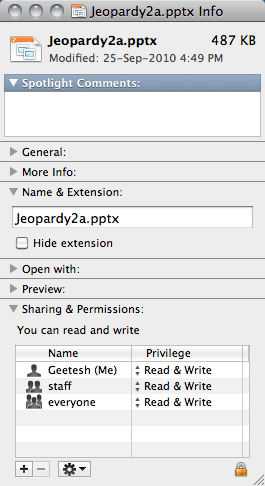
You already learned how you can show or hide file extensions for all files on Mac OS X. Now let me show you how you can enable the visibility of the file extension for just one file:
Filed Under:
Apple
Tagged as: File Extensions, Mac, Mac OS X, Show File Extensions, Show or Hide
Comments Off on Show or Hide File Extensions on the Mac for one file
One of the biggest pain points for those who get started using Mac OS X after coming from an older Windows world is that you cannot really see file extensions in OS X’s Finder. Many of these Mac newbies believe that there are no file extensions at all on OS X, but that is simply not true.
You can enable file extensions to show on Mac OS X on a global scale for all files, or for just a particular file. In this post, you will learn how to enable the visibility of file extensions globally on OS X. I am using OS X 10.6.8 (Snow Leopard) but this process works similarly on other iterations of OS X:
Filed Under:
Apple
Tagged as: File Extensions, Finder, Mac, Mac OS X, Show File Extensions
Comments Off on Show File Extensions on the Mac for All Files
Is it just me, or did you all find that it was not very intuitive how you could pause the Lion OS download from the App Store, and then resume it again? Even in today’s always-connected-with-a-fat-data-pipe days, 3.74 GB is not a very tiny download size!
I found a quick way and wanted to share it with everyone else. So this is what you need to do; I am assuming that you have already purchased Lion on the App Store, and your download is proceeding, as can be seen within the visual indicator you see below the Lion icon on the Dock, as shown in Figure 1 below.
Filed Under:
Apple
Tagged as: App Store, Download, Mac OS X Lion, Pausing and Resuming
Comments Off on Mac OS X Lion: Pausing and Resuming the 3.74 GB Download
Microsoft announced and showed the new Windows Phone 7 series at the Mobile World Congress in Barcelona.
Tons of new features and a whole new approach make this a very awaited product to watch out for — there’s a little of Zune, so much of Facebook, and Twitter — and of course even the Xbox. It looks like Microsoft is pulling no stops this time around to make sure that this product has the aesthetics and the functions that users want. It will be interesting to see what impact this has on Apple’s future plans. Meanwhile, this cool video has a lot going for it.

Filed Under:
Phones
Tagged as: Facebook, Twitter, Windows Mobile, Windows Phone 7, Xbox, Zune
Comments Off on Windows Phone 7 Series
One of the frustrations of working with web-based programs including email apps like Gmail, Hotmail, etc. stems from the fact that you cannot paste pictures from say your Word document or PowerPoint presentation into an email message that you are composing.
With web based applications becoming more commonplace, this sort of clipboard access option becomes more of a necessity. That’s why I was glad to see this new company called PicturePaste that has developed a product of the same name.
Filed Under:
Internet
Tagged as: Email, Gmail, Hotmail, Paste Pictures
Comments Off on PicturePaste: Paste Pictures into Gmail, Hotmail, etc.
In the past few weeks that I have been playing with Windows 7, I have found many small and simple improvements that no one talks about! I’m guessing they are all talking about the big improvements.
The first of these small things is that Windows Media Player now plays QuickTime MOV files, even if you have no QuickTime Player installed! Wow, who saw that coming?
Filed Under:
Microsoft Windows
Tagged as: QuickTime Playback, Windows 7, Windows Media Player
Comments Off on Small Simple Windows 7 Stuff 01: QuickTime Playback
Microsoft and the Office logo are trademarks or registered trademarks of Microsoft Corporation in the United States and/or other countries.