
This is the print version of this page. All content is copyright Indezine.com 2000-
2026.
Technology made easy
See Also:
PowerPoint and Presenting Stuff
Pictures, Video, and Multimedia
Animoto, an online video editor that I have mentioned in an earlier blog post is coming up with holiday cards that are actually video clips you customize within the Animoto interface.
The folks at Animoto do say that the personalized holiday cards won’t be ready until December 1st–but they wanted to provide a sneak preview of the holiday greeting cards that they will make available later next month.
Filed Under:
Video
Tagged as: Animoto, Fun, Holiday Cards, Movies
Comments Off on Animoto Holiday Cards
Apple has done the impossible again! If you thought that the Apple iPod Nano music player was incredibly small, then think again because Apple has now managed to fit in video recording and an FM radio tuner within the new generation of the product without increasing its dimensions.
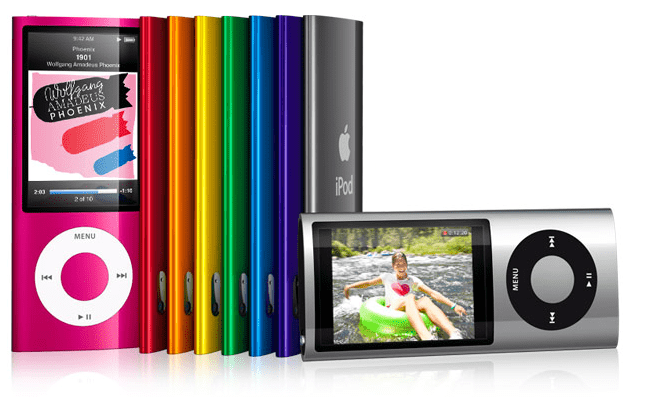
Comments Off on Apple’s New Nano Adds Video Recording and FM Radio!
Microsoft may be opening their first retail stores, a la Apple Stores as early as this fall in Scottsdale, Arizona and Mission Viejo, California.
No word is available yet about any store launches outside the US but according to eWeek, the Mission Viejo store will open at a mall that includes a successful Apple Store.
Filed Under:
Microsoft
Tagged as: Microsoft Retail Stores, Retail
Comments Off on Microsoft Retail Stores — First Opening at Scottsdale, AZ and Mission Viejo, CA
Do you find that some sites don’t open for you, or return errors? Move to another system in another location and the same site works flawlessly? Well, that may be happening because you are using the DNS of your ISP (Internet Service Provider) — and these are set by default to values hidden in your Internet settings or in your router, so you probably did not even know that you could change them!
So what exactly is a DNS? DNS stands for Domain Name System (or Service or Server), a service that translates Internet URLs such as www.microsoft.com, www.google.com, etc. into a set of numbers called IP addresses that read like 72.14.207.99, or 208.77.188.166, or similar sets of numbers. Your web browser understands IP addresses rather than URLs — so it needs to translate the URL you want to visit into a specific IP address. For this task, it needs to approach a DNS. Without access to a DNS, your web browser would not be able to get you anywhere online!
Comments Off on Focus on OpenDNS
Animoto is a video creation site that makes everything involved in the creation of video clips and montages super-easy. Sign-up is quick and simple, and you can get started working straight away!
While creating longer video clips requires you to pay either through a credits or subscription model, you can create 30-second short clips (Animoto calls these “shorts”) for free.
Filed Under:
Video
Tagged as: Animoto, Create Online Videos, Movies, Video
Comments Off on Animoto: Create Online Videos
What do you add to a suite of programs that already include everything apart from the kitchen sink? Three years is a long time in computerese — and that’s around the time since the last version of Microsoft Office (Office 2007) showed up. Office 2007’s biggest new feature was the Ribbon interface (also called Fluent) — and this time, Microsoft has had to create more usability features so that users are convinced to upgrade to the upcoming Office 2010 — and that’s a great thing to happen!
Filed Under:
Microsoft Office
Tagged as: Excel, Microsoft, New Features, Office 2010, OneNote, PowerPoint, Word
Comments Off on What’s New in Office 2010?
I have worked with Mark Anderson of Andertoons before, and he provided several free cartoons for the CD of one of my PowerPoint books, Special Edition Using Microsoft Office PowerPoint 2007.
Now Mark is providing one of his awesome cartoons absolutely free, only for today! Participants can use the cartoon in presentations, newsletters, websites, and anything else that could use a good laugh. The free cartoon will be offered for one day only with the only stipulation being that you do not resell the image or profit from it.
Filed Under:
Fun
Tagged as: Cartoons, Free Cartoon, Fun, Graphics, Visuals
Comments Off on Free Cartoon for the Day from Andertoons
Microsoft’s site has an updated Office 2010 section that provides plenty of info on what’s coming in the next release of the world’s most popular suite of office applications (see Figure 1 below).
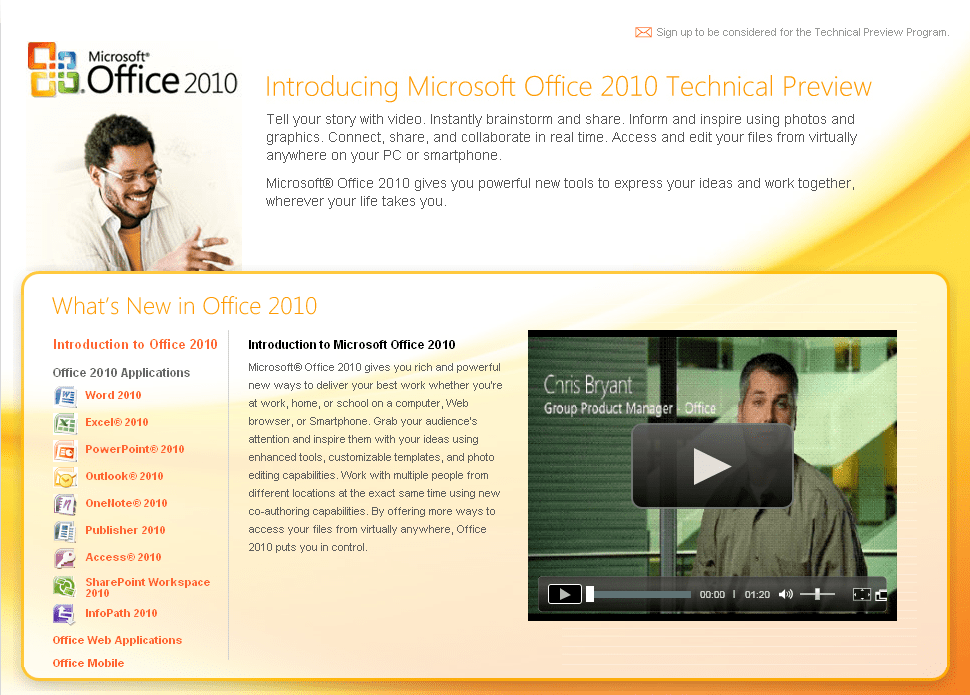
Figure 1: Office 2010 Site
Filed Under:
Microsoft Office
Tagged as: Microsoft, Microsoft Office, Office 2010
Comments Off on Focus on Microsoft Office 2010 Site
My dictionary defines comparison as the act of examining resemblances, and this post looks exactly at that sort of act. So what are we comparing? Are these apples or oranges, or something more similar — maybe oranges and lemons? Well, you can decide that later — for now let us look what everyone in the online world has to say about Microsoft’s Web Apps and Google Docs. This promises to be very interesting!
Ian Paul of PC World thinks that “the future may be the cloud, but it also may be Microsoft that ushers us into that realm of possibility and imagination.” He adds, “Forget about the half measures of Office Live Workspace; Microsoft’s new Web apps will let you create, edit, and save documents right online. Here’s a quick head-to-head between Google and Microsoft Web apps.”
Read more on the PC World site.
Filed Under:
Microsoft Office
Tagged as: Excel, Google, Google Docs, Microsoft, Microsoft Office Web Apps, Office 2010, OneNote, PowerPoint, Word
Comments Off on Microsoft Office Web Apps and Google Docs: The Tale of Curious Comparison
The Windows Club released Ultimate Windows Tweaker v 2.0 for Windows 7 and Windows Vista.
Ultimate Windows Tweaker v 2.0 is a freeware TweakUI-style utility that enhances and optimizes Windows 7 and Windows Vista systems, both 32-bit and 64-bit. You can also download and use it as a portable application to customize your Windows installation, as needed. The creators of this program claim that “with judicious tweaking, it can make your system faster, more stable, and more secure with just a few mouse clicks.”
Filed Under:
Utilities
Tagged as: Freeware, Microsoft Windows, Tweak, Utilities
Comments Off on Ultimate Windows Tweaker v2.0: Free Tweak Software for Windows Vista and Windows 7
Microsoft and the Office logo are trademarks or registered trademarks of Microsoft Corporation in the United States and/or other countries.